Array Settings
Settings for an array may be accessed by touching or clicking the Go To field on the Control List. The Array screen displays information regarding various aspects of the array and its constituent members. Two tabs are presented - Array and Settings.
 Array Tab
-
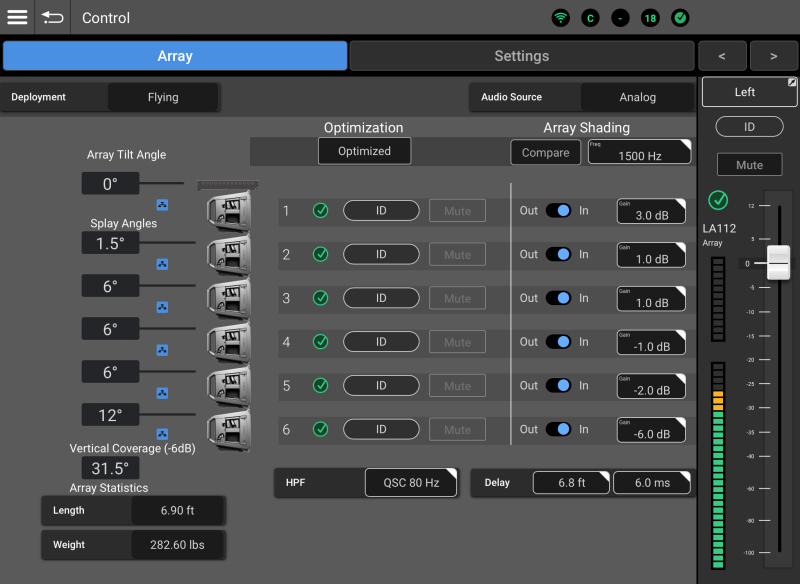
Deployment – Currently limited to Flying. Future releases will support ground-stack and pole or tripod-mounted presentation as well.
-
Audio Source – If no members of the array are subscribed to a Dante transmitter, this field will read “Analog”.
-
“Dante” is displayed in bright white to indicate that all members of the array are subscribed and connected to the same Dante transmitter.
-
“Dante” is displayed in gray to indicate that at least one member of the array is not subscribed or connected to a Dante transmitter.
-
“Multiple” is displayed to indicate that one or more array members has a Dante subscription that differs from the others.
-
-
Optimization
An array is Optimized when the DSP settings of the array members all match and the appropriate filters have been applied based on information provided by QSC AWARE™ regarding the number of array member loudspeakers and total splay. Also see Ar-Q. – See the “Arrays and Loudspeakers” section of List View for an explanation of optimization.-
Unoptimized Array – The button is yellow and reads “Apply”.
-
Optimized Array – The button is black and reads “Optimized”.
Note: An optimized array will become unoptimized if the splay angles of array member loudspeakers are changed.
-
-
Array Shading – The array shading function includes these controls:
-
Compare – Toggles array shading on and off.
-
Freq – Selects the frequency of the array shading filter.
-
Out / In – Switches array shading on and off for individual loudspeakers.
-
Gain – Determines how much gain is applied above the shading frequency.
-
-
Array Tilt Angle – Displays the tilt angle of the array frame as reported by AWARE
Automatic Wireless Array Recognition (AWARE™) is a system using infrared communication links and internal accelerometers to allow active line-array loudspeakers to determine that they are a members of an array, their position in the array and their relative and absolute deployment angle.. -
Splay
The angle between two adjacent loudspeakers in an array. Angles – Displays the angle between adjacent loudspeakers as reported by AWARE. -
Vertical Coverage – Displays the total splay angle of the loudspeaker array.
-
Connection Icons – Indicate how each loudspeaker is connected to SysNav.
-
Blue network icon – Indicates a direct network connection to SysNav.
-
Red IR icon – Indicates that the loudspeaker is connecting with SysNav indirectly via IR communication to another array loudspeaker with Direct Connection
A connection to SysNav in which all array member loudspeakers are wired to the SysNav connection. An alternative - Indirect Connection - is also supported. to SysNav (as opposed to Indirect Connection A connection in which SysNav controls an entire array with only a single array member loudspeaker connected to the SysNav network. When used in this manner, the non-networked loudspeakers relay data to the connected loudspeaker via infra-red (IR). Note that some features such as firmware updates may not be available.).
-
-
Array Statistics – Displays the overall length and weight of the array. Units of measure may be changed from the Preferences screen.
-
Loudspeaker Status, ID and Mute – These controls are identical to their counterparts described in List View.
-
HPF - Opens a menu with HPF (High Pass Filter) options for use with:
-
No subwoofer.
-
QSC subwoofers using an 80 Hz high-pass.
-
QSC subwoofers using a 100 Hz high-pass.
-
-
Delay – Input a signal delay using distance or time.
Settings Tab
-
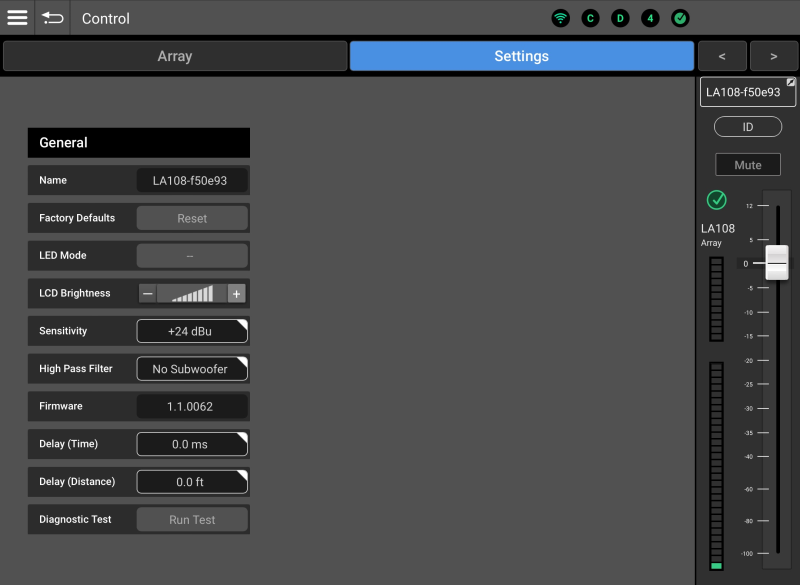
Name – This field is used to enter and display a name for the array.
-
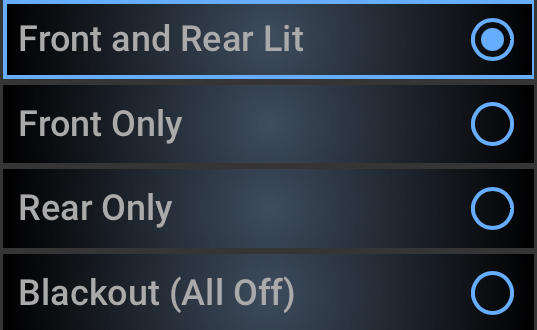
LED Mode – Controls the front and rear LED’s of the array member loudspeakers. For example:

-
LCD Brightness – Controls the brightness of the rear panel LCD on all array member loudspeakers.
-
Sensitivity – Selects +4 or +24 dBu input sensitivity for the analog inputs of all array member loudspeakers.
-
High Pass Filter – Opens a menu with HPF (High Pass Filter) options for use with:
-
No subwoofer.
-
QSC subwoofers using an 80 Hz high-pass.
-
QSC subwoofers using a 100 Hz high-pass.
Note: The QSC subwoofer settings are phase-optimized for use with QSC K, K.2, KW, and KLA active loudspeakers.
-
-
Firmware – If all array loudspeakers that are directly connected to SysNav are running the same firmware version, their release number will be displayed. If one or more array loudspeakers are running different firmware versions, the Firmware field will display “Multiple”.
-
Delay (Time and Distance) – Input a signal delay using distance or time.